Frequently asked questions (FAQs)
Account setup and login
-
Where do I purchase a parking permit?
Parking permits can be purchased through the OPSCOM portal.
-
I can't log into the new parking portal. What should I do?
If you are a current employee and had an active parking permit in the previous system, your account may already exist. In the OPSCOM portal, use your work email as your username, select Forgot Password, and follow the reset instructions. For next steps please refer to the instructions provided in the campuswide communication or visit the Parking Services website for step-by-step instructions.
-
I'm a current employee and my information did not transfer correctly from the previous system. What should I do?
Please contact Parking Services at parking@ontariotechu.ca and provide your name, Banner ID, employee email address, and details requiring correction.
-
Where can I get in-person support?
Contact Parking Services at parking@ontariotechu.ca or visit the parking office located at the UA link. Please see link to the campus map - Ontario Tech Map.
Permit renewals and existing permit holders (employees only)
-
I had a permit last year. Has it been transferred to the new system?
Most active permit holders were migrated and their permit may already be sitting in their cart awaiting payment confirmation. Please click on the cart tab on the left hand side of the screen to see if there is a permit there. If not, please click on the permits tab to select your desired permit and payment frequency.
-
How do I know if my permit renewal was successful?
Please check your purchase history, email receipt, or home tab which will show your active permit (if any).
-
I currently have Founders 1. Will I lose my spot?
Existing permit holders who successfully complete renewal will retain their permit allocation.
Monthly vs annual permits (employees only)
-
Can annual permits be paid monthly?
Yes. Save a credit card, enable Permit Rollover, and choose the monthly option.
-
Do I need to log in every month and renew?
- If you are purchasing a monthly permit and would like the system to automatically charge your saved payment method when your permit renews each month, you must enable Permit Rollover on your payment method. Otherwise, the renewed permit will remain in your cart until you manually enter your payment information each month.
- Next, to manage your renewal settings, select the drop-down arrow beside your name in the left-side navigation bar, click Home, and select your permit under Active Permits. From there, you can enable or disable the Permit Renewal Status.
-
I accidentally paid annually. Can I switch to monthly?
Contact Parking Services at parking@ontariotechu.ca for assistance. Changes after payment may require manual intervention.
Student parking
-
When do student permits go on sale?
Student permit sales begin Tuesday, August 4 at noon. Please visit the Parking Services website for more information.
-
Can students purchase permits now?
No. Students must wait until noon on Tuesday, August 4 to purchase their permit.
-
Can I create an account before sales open?
Yes, you may create your parking portal profile in advance, but permits cannot be reserved or purchased until sales open. Please visit the Parking Services website for instructions on creating an account.
Parking access cards and privileges
-
I already have an access card. What should I do?
Existing access cards for gated lots will continue to be used unless advised otherwise. Visit the Parking Services Office after September 1 to have your card reactivated or send in an email with your card number and name to parking@ontariotechu.ca.
-
What is the cost of a replacement access card?
The replacement access card fee is $25.
-
Will my Whitby and Oshawa parking privileges continue?
Contact Parking Services at parking@ontariotechu.ca to verify your specific access profile and cross-campus privileges.
-
Will dual-campus permits continue to work?
Existing dual-campus privileges are expected to continue where operationally required.
-
When can I pick up my access card?
Visit the Parking Services Office located at the UA link after September 1 to have your card reactivated or send in an email with your card number and name to parking@ontariotechu.ca.
Please see link to the campus map - Ontario Tech Map.
Vehicles and license plates
-
Can I register more than one vehicle to my account?
Yes, you can register a maximum of three vehicles. However, only one registered vehicle may be parked on campus at a time.
-
Can I change my registered vehicle later?
Yes, vehicle information can be updated through the portal.
-
I entered the wrong license plate. What should I do?
Contact Parking Services at parking@ontariotechu.ca if the portal will not allow edits or removal.
Waitlists and lot changes
-
I joined a waitlist by mistake. How do I remove myself?
Please contact Parking Services at parking@ontariotechu.ca for assistance.
-
Can I purchase another lot while on a waitlist?
Yes, you can purchase another lot while you are on a waitlist for a desired lot that is full.
-
Can I switch lots if space becomes available?
Yes, subject to availability and permit rules. Please contact Parking Services at parking@ontariotechu.ca for assistance.
Gated vs ungated parking
-
What is the difference between gated and ungated lots?
Gated lots require card access, while ungated lots rely on license plate recognition.
-
Which lots are gated?
Charles Hall (61 Charles Street), Commencement North, and Whitby Main South (off Champlain Street).
-
Which lots are ungated?
Founders 2, Founders 4, Founders 5, Simcoe Village and Whitby Main (off Stellar Street).
-
Is there a map showing lot configurations?
Yes, campus maps as shown below are available through Parking Services. Please contact parking@ontariotechu.ca for assistance.
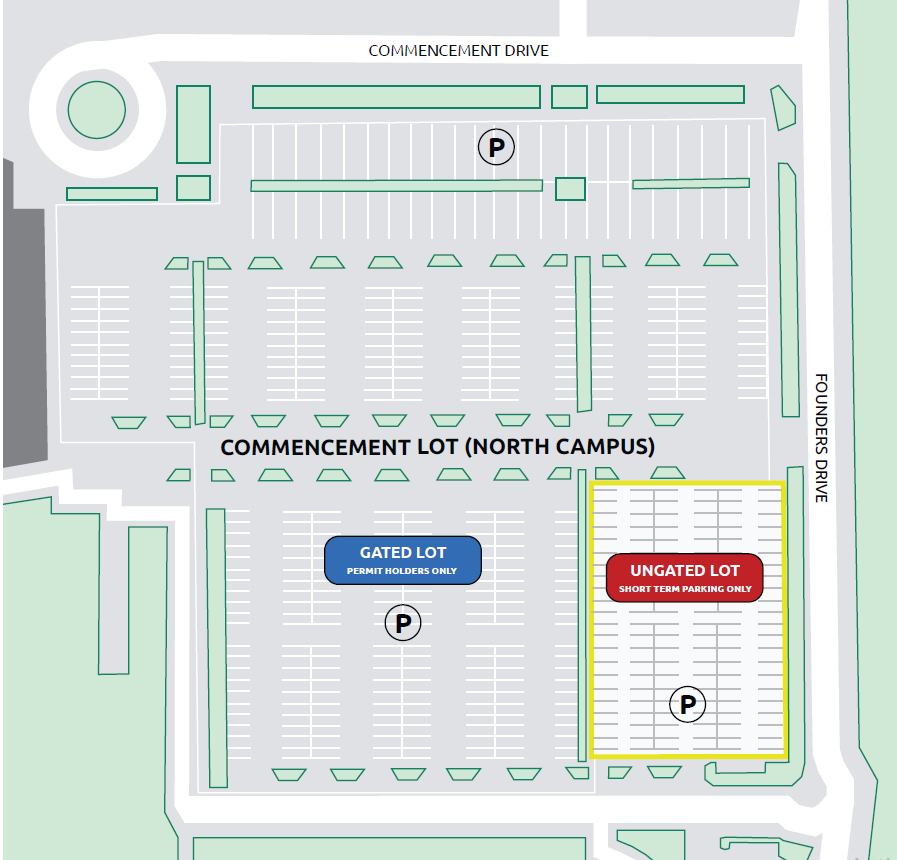
Commencement lot (North Campus)
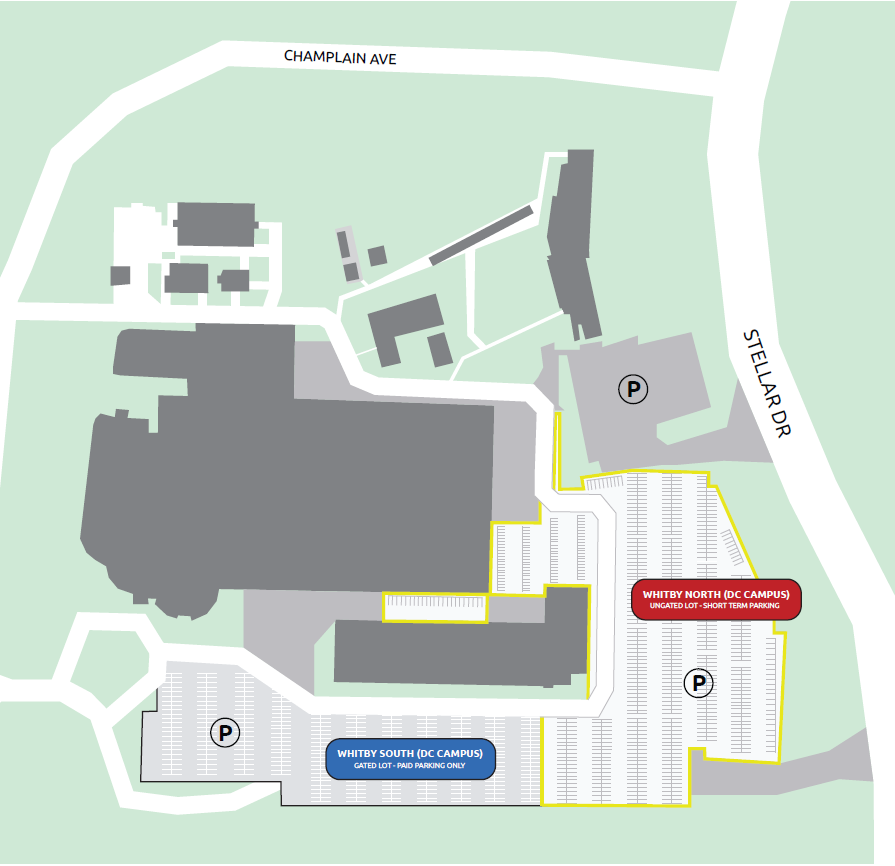
Whitby North and South lot
-
Will I receive a physical permit for an ungated lot?
No, your permit is associated with your license plate using License Plate Recognition (LPR) technology.
Payments
-
Why am I being charged now for a September permit?
The payment reserves your permit for the upcoming academic year.
-
My credit card was declined even though it is saved.
Please contact your bank and attempt to make the payment again.
-
What payment methods are accepted?
Visa, Visa Debit, and Mastercard.
-
How much do permits cost?
Please visit the Parking Services website and navigate to either the student or employee section to find the parking permit rates for 2026/2027.