






OSAP for Micro-credentials
How to register and apply?
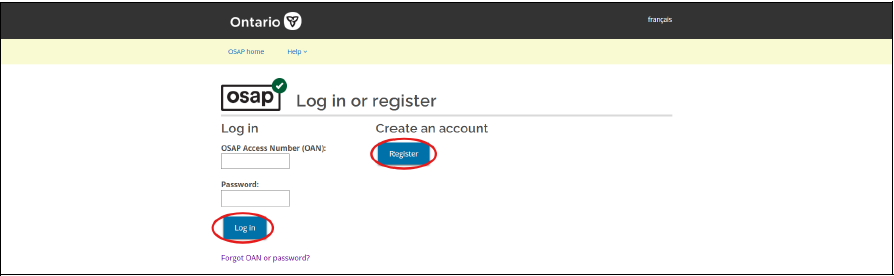
1: Register and pay in full. Confirm that your chosen course or program is OSAP-approved, then complete registration and payment. When registering and applying for OSAP funding, please use the same name and email address for both.
Our regular withdrawal and refund policies apply, including if your OSAP application is not approved or if your funding does not cover the full cost.
2: Apply for OSAP. Sign in to your OSAP account or create an account. Select the OSAP for Micro-credentials application and complete the required information. Submit your application no later than your course or program end date. You can only receive micro-credential OSAP funding for one course or program at a time.
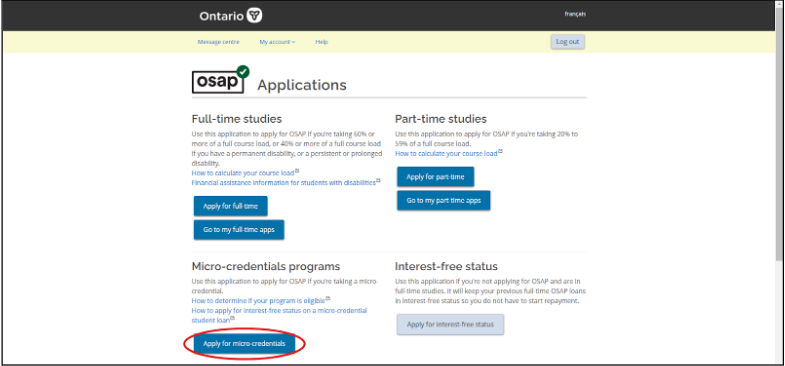
3: On the next page, select and complete the OSAP for Micro-credentials Application (Apply for micro-credentials). New applications must be submitted online no later than the course end date. You can only receive OSAP for Micro-credentials funding for one course at a time.
4: Check your application. Monitor your OSAP account for updates and provide any additional documents or information requested. Ontario Tech’s Financial Aid team will confirm with the Ministry that you have registered and paid in full for the course or program listed in your application. OSAP eligibility and funding are determined through the application assessment process.
5: Receive your funding, if approved. Once your application is complete and your course or program has started, Ontario Tech will confirm your enrolment. Approved funding will then be issued directly to your bank account.
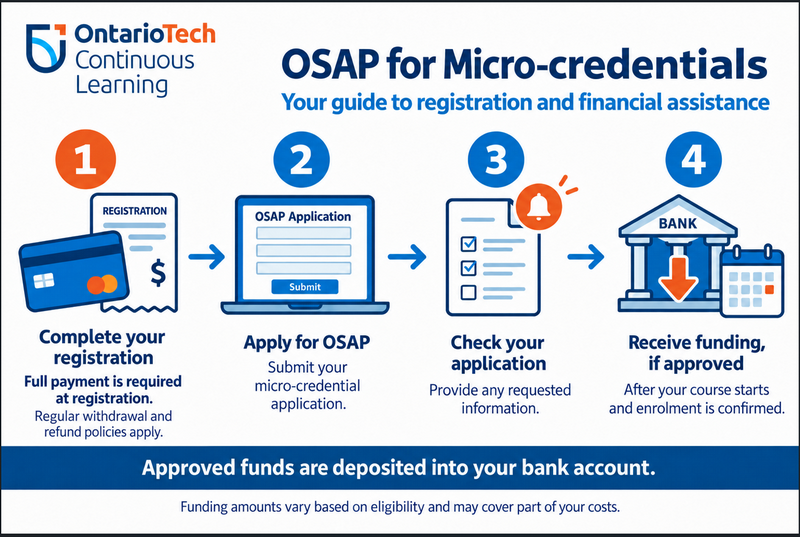
Funding is subject to individual eligibility and assessment and may not cover the full registration cost. Registering and paying does not guarantee OSAP approval.